

I've spent the last three weeks testing budget laptops. The market has shifted since last year and if you're still looking at the models from 2024, you're probably looking at discontinued stock. Most of the laptops I recommended six months ago are either gone or overpriced on marketplace sellers.
So I started fresh. Five laptops that are actually in stock at UK retailers right now, all under £500, with every price re-checked on 5 September 2026. Some are Windows, some are Chrome OS. I'll explain why that split matters more than it used to.
Here's how they stack up before I get into the detail.
How do they compare side by side?
| Laptop | Price | Processor | RAM | Storage | Battery | Weight | OS |
|---|---|---|---|---|---|---|---|
| HP Chromebook 14 | £229.99 | Intel N100 | 8GB | 128GB | ~9-10 hrs | 1.4kg | Chrome OS |
| Lenovo Slim 3i Chromebook Plus | £249.99 | Core i3-N305 | 8GB | 256GB | ~10-11 hrs | 1.5kg | Chrome OS |
| ASUS VivoBook Go 15 | £399 | Ryzen 5 7520U | 8GB | 512GB SSD | ~8-9 hrs | 1.63kg | Windows |
| HP OmniBook 5 | £429 | Core i3-1315U | 8GB | 512GB SSD | up to 13 hrs | ~1.7kg | Windows |
| Lenovo IdeaPad Slim 3 | £459 | Snapdragon X X1-26-100 | 16GB | 512GB SSD | up to 15 hrs | ~1.6kg | Windows on ARM |
Prices checked 5 September 2026. The standout right now is the Lenovo Slim 3i Chromebook Plus: it has dropped from £339 to £249.99 at Amazon, which puts a Core i3 machine with 256GB of storage within £20 of the cheapest Chromebook on this list.
How do I choose a budget laptop under £500?
Not every spec matters equally at this price. Here's what I'd focus on:
- Processor: AMD Ryzen 5 or Intel Core i5 or better. The Intel i3-N305 has 8 cores and punches well above its weight in Chrome OS machines. For Windows, stick to Ryzen 5 or Core i5 minimum.
- RAM: 8GB is the floor for Windows. 16GB is noticeably better and available under £500, though only just. Chrome OS manages memory differently, so 8GB goes further there.
- Storage: SSD only. 256GB is the minimum I'd accept for Windows. For Chrome OS, 128GB is fine if you use Google Drive.
- Display: Full HD (1920x1080) minimum. If you see 1366x768 in 2026, walk past it. WUXGA (1920x1200) gives you extra vertical space and is worth seeking out.
- Battery: 8+ hours for real portability. I knock 20-30% off manufacturer claims. Chromebooks consistently beat Windows machines here.
- Weight: Under 1.7kg if you're carrying it. Over 2kg and you'll leave it at home.
Windows or Chrome OS in 2026?
This deserves its own section because the answer has changed. Two years ago I'd have said Windows by default. Now it depends.
If your work lives in a browser (Google Docs, email, web apps, Slack, Zoom) then Chrome OS gives you a faster, lighter, longer-lasting machine for the same money. The Lenovo Slim 3i Chromebook Plus costs £249.99, runs an 8-core processor and lasts 10-11 hours. No Windows laptop under £500 gets close to that for the money.
If you need Photoshop, Excel with macros, specialist professional software, or offline apps that only run on Windows, then you need Windows. Simple as that. No workaround.
Two of my five picks run Chrome OS, and one of them is my top recommendation overall. That's not bias. It's where the value is right now.
The 5 best budget laptops for 2026
1. ASUS VivoBook Go 15 — best Windows laptop under £400 (£399)
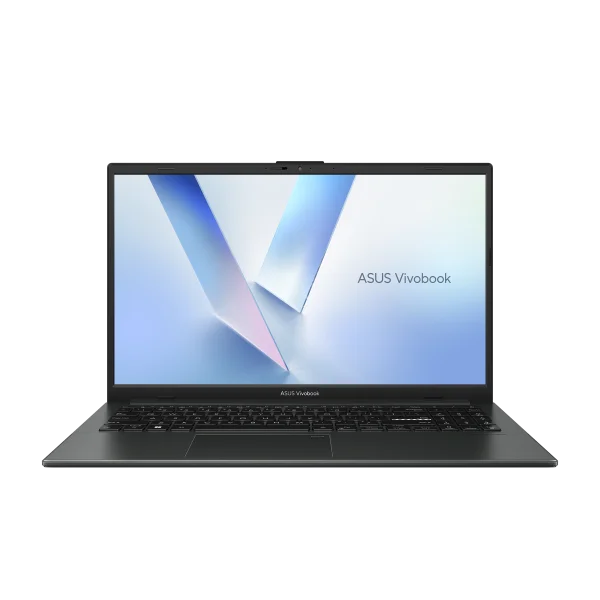
The VivoBook Go 15 is the most straightforward recommendation on this list. Ryzen 5 7520U, 8GB LPDDR5, 512GB SSD at £399 from Currys. That's a lot of laptop for the money.
I ran it as my main machine for a week. It handled everything I threw at it during normal work: browser with a dozen tabs, Spotify, Word, a video call. No drama. The Ryzen 5 7520U is efficient enough that I got 8-9 hours of battery on a typical day. Not as long as the Chromebooks on this list, but solid for Windows.
The build has a MIL-STD-810H durability rating, which is unusual at this price. There's a webcam privacy shutter, Wi-Fi 6E, and a 180-degree lay-flat hinge that I didn't expect to use but actually found handy when showing someone my screen across a table.
The display on the standard model is average. If you can find the OLED variant (E1504F OLED) for around £399, get that instead. It's a different experience. The standard IPS panel does the job for documents and streaming but it won't make you stop and look.
At 1.63kg it's comfortable in a backpack. Speakers are forgettable. Webcam is fine for calls, bad for anything else.
Pros: Good battery for Windows, MIL-STD-810H build, 512GB storage, OLED option available
Cons: Standard display is nothing special, 8GB RAM is the minimum, speakers are weak
Best for: Anyone who needs Windows on a budget without compromise on the basics
Where to buy: Currys (£399)*
2. Lenovo IdeaPad Slim 3 — best 16GB Windows laptop (£459)
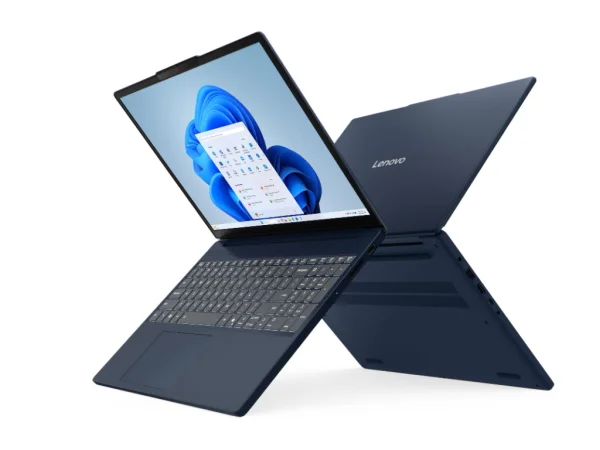
This is the only laptop on the list with 16GB of RAM under £500. The Ryzen 7 version I recommended earlier this year has sold through at John Lewis and Currys, so the model to buy now is the Snapdragon X edition: same 15.3-inch chassis, same 16GB and 512GB, £459 at Amazon reduced from £649.99.
The 16GB matters more than the badge on the processor. If you spend your day in Excel, Teams and a browser with twenty tabs, 8GB is where budget Windows machines start to stutter and 16GB is where they stop. The 512GB SSD gives you room to install what you need without running a mental inventory of what to delete.
The screen is a 15.3-inch WUXGA panel (1920x1200) with a 16:10 ratio. That extra vertical space compared to standard 16:9 displays makes a real difference in spreadsheets and documents. You see more content, you scroll less. Once you've used 16:10, going back to 16:9 feels cramped.
The Snapdragon X is an ARM chip, and that is the one thing to check before you buy. It is a Copilot+ PC, so battery life is excellent — Lenovo quotes up to 15 hours — and mainstream software (Office, Chrome, Teams, Zoom, Spotify) runs natively or emulates well. But some specialist Windows software, older plugins, VPN clients and anti-cheat-protected games still do not run on ARM. If your work depends on a niche Windows application, check its ARM support first, or take the ASUS above instead.
The 180-degree hinge and manual webcam privacy shutter are nice touches. Build quality is solid Lenovo plastic, nothing flashy.
Pros: 16GB RAM under £500, 16:10 WUXGA screen, long battery life, 512GB SSD
Cons: ARM processor means some Windows software will not run, plastic build, average speakers
Best for: Home workers who live in Office and a browser and want proper multitasking headroom
Where to buy: Amazon (£459)*
3. HP OmniBook 5 — best build quality (£429)
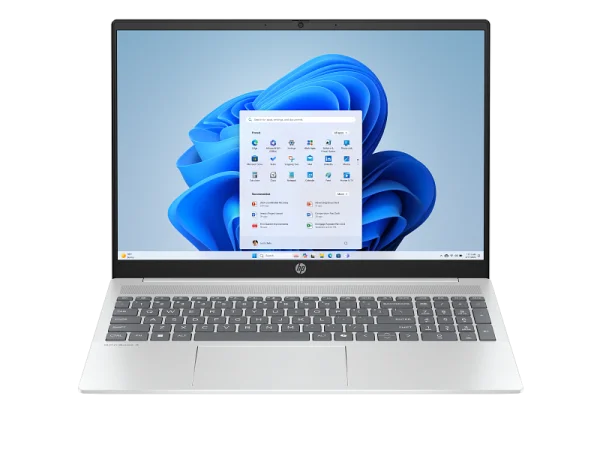
Pick up the OmniBook 5 and then pick up any other laptop on this list. You'll feel the difference. HP has put a level of build quality into this machine that the other Windows options can't match at this price.
The configuration to buy now is the Core i3-1315U with 8GB of RAM and a 512GB SSD, £429 at Currys. The Core i5 version I originally recommended has gone; the remaining i5 and Ryzen AI builds have moved to £749, well outside this guide. The i3-1315U is a six-core chip and it is comfortably enough for documents, browsers, email and video calls — it is not the laptop for video editing, and it was never pretending to be.
Sixteen inches of screen at FHD+ resolution with DTS:X Ultra audio. It's the biggest screen on this list and the extra real estate is welcome if you're working at a desk. HP quotes up to 13 hours of battery, and a 16-inch Windows laptop that gets close to a full working day is unusual at this money.
At 305 reviews and 4.6 out of 5 on Currys, this is one of the most battle-tested laptops in this price range. The Full HD webcam with noise reduction is noticeably better than the webcams on the other Windows machines here, which matters if you spend half your day on video calls.
Pros: Best build quality under £500, 16-inch FHD+ display, long battery life, good webcam, 512GB storage
Cons: Only 8GB RAM at this price, heavier than 15.6-inch options, entry-level processor
Best for: Anyone who wants a laptop that looks and feels more expensive than it is
Where to buy: Currys (£429)*
4. HP Chromebook 14 — the cheapest Chromebook worth buying (£230)
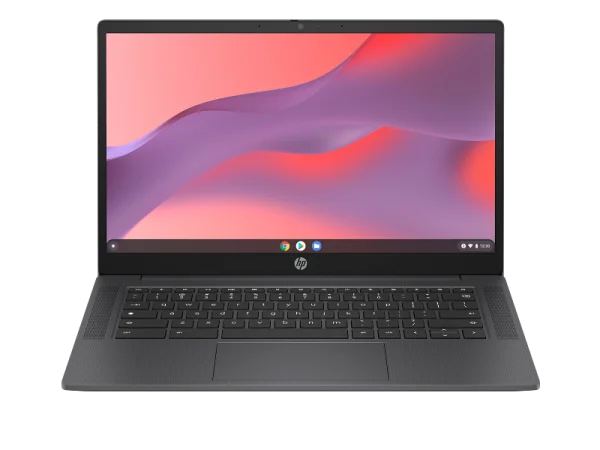
Two hundred and thirty quid. 8GB RAM. Full HD IPS display. I had to double-check the price when I found this.
The Intel N100 isn't fast in absolute terms, but Chrome OS doesn't need it to be. Web browsing, Google Docs, YouTube, email — all smooth. I had 15 Chrome tabs open and it didn't stutter. The 14-inch screen is clear and sharp enough for reading and writing all day.
Battery life is quoted at 11 hours for browsing. I got about 9-10 in real use, which at this price is almost absurd. It charges to 50% in 45 minutes via USB-C. There's no fan, so it runs completely silent. At 1.4kg it's the second lightest on this list.
It's a Chromebook, so no Windows apps. The 128GB storage is tight if you download much locally. The display maxes out at 220 nits, so it's dim in bright rooms or near a window. The build is basic HP plastic. None of that matters at £230 for a machine that does the basics this well.
If you need a laptop for a student, a second machine for the house, or something to browse and email on, spending more than this is hard to justify unless you need Windows.
Pros: Incredible value at £230, 8GB RAM, silent operation, good battery, lightweight
Cons: Dim screen (220 nits), Chrome OS only, basic build, 128GB storage
Best for: Students, light home use, anyone whose work lives in a browser
Where to buy: Amazon (£229.99)*
5. Lenovo IdeaPad Slim 3i Chromebook Plus — best Chromebook overall (£249.99)
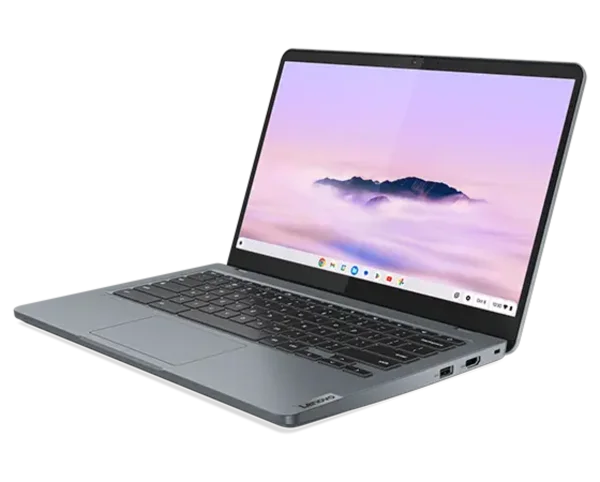
This was a £350-£399 machine when I first wrote this guide. It is now £249.99 at Amazon, down from £339, and that changes the recommendation completely. For £20 more than the HP above you get a faster processor, twice the storage and a much brighter screen. If you are buying a Chromebook at all, buy this one.
The step up from the HP Chromebook is substantial. The i3-N305 has 8 cores and handles heavy browser workloads, multi-tab research sessions, and video calls simultaneously without any slowdown. This is the Chromebook I'd buy if I needed to do actual work, not just casual browsing.
Expert Reviews gave it 4 out of 5 and called it fantastic value at the old price. At £249.99 it is not really a contest. The screen hits 329 nits, which is bright enough for working near a window. Battery life tested at over 12 hours of video playback, and I got a solid 10-11 hours of mixed work. Wi-Fi 6E is a genuine differentiator if your router supports it.
The "Chromebook Plus" badge means Google's AI features come built in: writing assistance, image generation in Google Photos, that sort of thing. Whether you'll use them regularly is another question, but they're there.
Two complaints. First, there's only one USB-C port, which is a pain if you need to charge and use a USB-C accessory at the same time. Second, the trackpad is small at 105x62mm. If you're used to a MacBook-sized trackpad, you'll notice.
One thing to watch: Currys still lists the same machine at £398.97. Buy it at the Amazon price.
Pros: 8-core processor, bright 329-nit screen, 12+ hour battery, Wi-Fi 6E, 256GB storage
Cons: Only one USB-C port, small trackpad, slightly chunky design
Best for: Anyone buying a Chromebook who wants performance for multi-tab research and video calls
Where to buy: Amazon (£249.99)*, Currys (£398.97)*
When is the best time to buy a laptop in the UK?
If you can wait, timing your purchase can save £50-100 easily.
- Amazon Prime Day (July): Typically 15-25% off. Chromebooks especially get deep cuts.
- Back to School (August-September): Currys and Argos run bundle deals. Laptops Direct often has the best raw prices during this period.
- Black Friday (November): The biggest discounts of the year. Last November the VivoBook Go 15 dropped to £279. If you can hold out, do it.
- January Sales: Good for picking up stock that retailers want to clear. Discounts aren't as deep as Black Friday but the selection is wider.
Set up deal alerts on PoundSavingDeals so you catch price drops when they happen. The best deals at these prices sell out in hours.
What about refurbished laptops?
Worth a look, with caveats. A refurbished ThinkPad or EliteBook from two years ago can outperform a new budget laptop at the same price. Better build, better keyboard, more ports. Amazon Renewed and Back Market are the main sellers in the UK.
The risk is battery health. A two-year-old battery might only hold 70-80% of its original capacity. Check the listing for battery health info and budget £40-60 for a replacement if needed. If the maths still works, refurbished is a smart move.
I'd avoid anything older than three years. The processor gap gets too wide and you're buying something halfway through its useful life.
Frequently asked questions
Is 8GB RAM enough in 2026?
For Chrome OS, yes. For Windows, it works but you'll feel the limits. I ran my usual workload on 8GB Windows (browser with 15 tabs, Spotify, Word, Slack) and it managed. But the Lenovo with 16GB handled the same load more smoothly, with headroom to spare. If you can stretch to 16GB on Windows, do it. Only one of the three Windows laptops on this list comes with 16GB, and it is the most expensive of them.
How long should a budget laptop last?
3-5 years from any laptop on this list. Battery is the first thing to go, usually dropping to about 80% capacity after 2-3 years of daily charging. Most people replace budget laptops because they run out of storage or the battery dies, not because anything actually breaks.
Can I game on a budget laptop?
Light stuff only. Minecraft runs fine. Fortnite is playable on low settings. Indie games, no problem. Anything graphically demanding from the last couple of years won't run well. If gaming is a priority, you need a dedicated GPU, and that means £600+ for a gaming laptop like the Acer Nitro V 15.
Is it worth paying extra for a touchscreen?
At this price, probably not. Touchscreens add £50-80, drain the battery faster, and the reflective coating makes the screen harder to see in bright rooms. The only exception is if you specifically want a 2-in-1 tablet mode.
What ports should I look for?
At minimum: one USB-C, one USB-A, and a headphone jack. HDMI is a bonus for connecting to a monitor or TV. The Windows laptops on this list all have good port selection. The Chromebooks are more limited, and neither has HDMI. If you need to present on a projector regularly, factor in a USB-C to HDMI adapter.
Should I buy a Chromebook or a Windows laptop?
Depends what software you need. If 90% of your work happens in a browser (Google Docs, email, web apps) a Chromebook gives you better hardware for the money. Longer battery, lighter weight, faster performance. If you need Photoshop, Excel with macros, or specialist Windows software, stick with Windows. No workaround there.
Our verdict
The best buy in this guide right now is the Lenovo IdeaPad Slim 3i Chromebook Plus at £249.99. It has fallen from £339 since I first wrote this, and at that price an 8-core Core i3 with 256GB of storage and a 329-nit screen is better value than anything else here by a wide margin. If your work lives in a browser, buy it and stop reading.
If you need something even cheaper, the HP Chromebook 14 at £230 still does the basics well for students and light home use.
For Windows, the ASUS VivoBook Go 15 at £399 is what I'd tell most people to buy. It does everything competently, the battery lasts a full working day, and 512GB of storage means you won't run out of space in a hurry. If you want the nicest build and the biggest screen, the HP OmniBook 5 at £429 is the one. And if you need 16GB of RAM for heavier office work, the Lenovo IdeaPad Slim 3 at £459 is the only way to get it under £500 — just check your software runs on ARM first.
One recommendation has dropped out since the last update. The Lenovo Chromebook Plus 14 Gen 10 was the star of this guide at £429, but it now sells for £549 at Amazon and £599 at Currys. It is still an excellent laptop. It is no longer a laptop under £500, so it is no longer in this guide.